Week 2-2: Media Proposal Frustration
After being really excited about the possibilities for my media project this past week I have been frustrated with the media content proposal this week. I cannot quite put into words the ideas that I have in my head. I do believe that it is a really great assignment because it has really made me focus in on what I want to create. However, I have had trouble explaining the media project in detail because I keep wanting to place my thesis work into my content proposal. I forget that the content proposal what my thesis looks like in action instead of trying to prove myself all over again.
Just like a rubik’s cube all of the parts are there, I just need to put them in the proper place and perspective. I think the major problem is that my ideas have been in my head for so long now it was as if my brain dumped all of my ideas out and now I have to organize them. This is why I believe placing the Media Content Proposal assignment earlier in another class would have been helpful.
Photo courtesy of: http://www.sxc.hu/index.phtml
posted by ryan jackson at 10:35 pm
labels: pilot groups, teacher feedback, thesis media project
piturachsatit said...
Ryan I couldn't agree more about the Media Content Proposal assignment being placed earlier in the class. I have been thinking about why it was placed at the end and I am thinking that the goal is for us to use all that we have learned throughout the year and put it into practice with the proposal. I still think this could have been done in draft form earlier and then completed this month.
Good look with the rest of this process. The fact that you desire to create something tangible with all that you have learned means that you will end up with a strong final product. Keep it up, it has been a pleasure working with you throughout the year.
March 10, 2010 8:10 AM
Wednesday, March 10, 2010

Tuesday, March 9, 2010
MAC WK 2 Blog 1 - Pacific Science Center

The Pacific Science Center came to our school today to teach science labs. It has been an exciting day of science. The 6th grade teachers decided to make it a day of science by incorperating science into all of our classes when we aren't doing the sceince center activities. I was impressed with the labs, as they use a problem-based learning appraoch to the activites. It helps brings out the students natural inquisitional minds.
One things I think they could improve on is in their whole group presntaions. For an organiztion as large as the Science Center the use of media in the assembly was non existent. All they used during the presentaiton was a small tabel up front of hundreds of students which made it difficult for everyone to see. To me it seems like they could step it up and make their presentation more exciting with video, music, and photos. The students were mildly engaged. Sceince is supposed to be exciting and students are naturally curious but, with this digital generation it is important to bring more to the table to get their attention.
Picture courtesy of http://www.pacsci.org/
Sunday, March 7, 2010
MAC WK 1 Blog 5 - Media Project Proposal
I. THESIS ABSTRACT
As standards and pressure to succeed increases for students their own intrinsic motivation to learn has begun to decrease. New pedagogies must be utilized in order to stimulate their internal desires to learn. Many have named this generation “digital natives” because they are growing up in an age that is immersed in an ever present and evolving technology that plays a significant role in their lives. Educators must learn how to take advantage of this technology in order to make school more relevant to these learners. The technology gives educators a tool to bring the necessary learning requirements to today’s students in a way that is relevant and meaningful. This puts students back into the center of the learning environment. When it is the students who are the center of learning, the classroom becomes a place where students feel more responsible for their own learning and that natural intrinsic desire can redevelop.
II. Introduction
Problem Addressed
Students of today have been labeled as digital natives. The world in which they have grown up is a digital one. They haven’t seen a progression from things like compact disks to mp3’s. The mp3 is what they have known from the beginning. Because of their familiarity with all things digital, traditional projects such as making posters on paper or dioramas are no longer exciting to them. James Pence, Marketing Director, Teacher's Domain, WGBH:
“I think that many times kids come to school and they have to power down. At home they’re online, they’re IM’ing, they’re doing their work, they’re checking the Web, they’re going to Wikipedia, they are downloading music, they’re playing music and they’re watching television all at the same time. The classroom is not like that” (Technology’s Effect on Education, 2008).
Teachers need to learn to harness 21st century technology in order to reach the digital native and motivate them in the classroom.
The key to making this happen is to use technology as a tool to teach what is already being taught in class. The trend in education today is to teach to different styles of learning and to provide classrooms where students are actively participating in the learning. Technology fits well with this new style of teaching as it can be utilized as an instructional tool (Eisenach, 2007). The use of Web 2.0 allows teachers to move beyond the regular paper and pencil assignments and let students delve into infinite possibilities of creating and exploration on the web. The tools of Web 2.0 allow the learning that goes on in the classroom to move away from a teacher-centered approach to one where learning is student-centered through project-based learning. “Project-based learning is a constructivist approach that encourages learning in depth by allowing students to use inquiry-based methods to engage with issues and questions that are rich, real and relevant to their lives” (Solomon & Schrum, 2007, pg. 39). Technology doesn’t make learning happen. It needs to be used with good pedagogy and with the understanding that it can increase student motivation in their progress to meeting standards.
Target Audience
Various Web 2.0 tools along with other form of technology will be used to help motivate students in the middle school setting. The project will be particularly geared to 6th grade students at Grand Coulee Dam Middle School in Grand Coulee, WA. They will be using this technology to demonstrate their understanding of state standards that are being taught in the classroom.
Sharing the project
The media project will be shared with the students of Grand Coulee Dam Middle School, along with staff and administrators. The project will be created with iWeb and it will be placed on the schools website to share with everyone what the students have been doing and their reflections on the activities they have been doing throughout the year. Video will also be used to capture student reflections to determine their own feeling about the technology that was used and its affect on their motivation to complete the assignment.
III. Goals and Objectives
Instructional Goal
The subject of the media project is reading comprehension. The students who will be participating in the media project are in the 6th grade and will be working towards standards as defined by the Washington State Grade Level Expectations (GLEs). The students will learn different ways to think about their reading and demonstrate their understanding of what they have read in order to improve reading comprehension. This will improve students reading levels and give them the ability to read and remember the information. The ability to remember what you have read, after you read it, goes far beyond the reading classroom. It applies to all subject areas, as reading plays a significant role in learning. Students with better reading comprehension have a higher chance of success in school and will provide greater opportunities for them out of school.
Learning Domain
The learning domain that the media project fits into is cognitive as well as affective. Students will be learning how to improve reading comprehension. Another objective of the media project is to increase student motivation through the use of technology. This will apply to the affective learning domain, as it will be working on improving student attitudes.
Learning Objectives
1. The students will summarize the plot/message in a culturally relevant literary/narrative text.
2. The students will state the theme/message and supporting details in a culturally relevant literary/narrative text.
3. The students will identify the characters traits and provide supporting details in a culturally relevant literary/narrative text.
4. Students will demonstrate through video their understanding of how a characters traits influence their decisions.
IV. Presentation
Instructional Approach
The learning theory applied to the project will consist of multiple theories: constructivist, inquiry, and direct instruction. This is based on the fact that there is no one, ideal theory; all of them bring something valuable to the table. It is up to the teacher to understand each theory and in their pedagogy bring what is needed in order to optimize the instructional design (Mergel, 1998). When student are immersed in a learning environment that understands the learners needs, students will be able to find success in their own skills and abilities and take more leadership in their learning. This student-centered approach will be applied to the media project as it is designed to let each student utilize his or her own learning style.
Each student learns in a variety of ways. These are called an individuals learning style which can be shown: by seeing and hearing, working alone and in groups, reasoning logically and intuitively, memorizing and visualizing and modeling (Felder, 2007). When each student understands their own learning style they are aware of techniques the teacher is using and can learn when they are being taught in a way that is more beneficial to them and in ways they may struggle with, which can be a key that they need to something to compensate for that fact. Teachers who are aware of the learning needs of their students can present the information in a variety of ways in order to meet the needs of students. They can also provide opportunities for students to demonstrate their understanding by giving them a choice of methods that would better suit their learning style.
Technology plays a significant role in a teacher being able to design instruction that is student-centered and presents the information in ways that meet the different learning needs of students. “Technology has the power to reach and motivate various learners” (Pitler, Hubblell, Kuhm, & Malenoski, 2007, p. 32). Using technology is an effective way for the teacher to differentiate the instruction for their students. Students get what they need, how they need it, and they enjoy the process more, which will ultimately contribute to deeper learning for the student.
Working with the Internet and technology to create things excites students. Being able to create a video, use a blog, build a cartoon and so on motivates students to get to work. What teachers need to be aware of is that that excitement and motivation don’t always lead to the results they are looking for. Using technology is fun, but learning itself isn’t always exciting, regardless of the topics, because it requires work. It is important for instructors use sound pedagogies and not just rely on technology to do all of the teaching.
When technology is used well, it can be a positive influence on student learning when applied with clear learning goals. Technology itself isn’t the answer. It is a tool that, when used in addition to sound teaching practices, can increase student learning and achievement and it stimulates motivation to learn. (Pitler, Hubble, Kuhm, & Malenoski, 2007). Teachers need to plan lessons with the learning outcome in mind not the technology. If the technology becomes the focus, the learning that is trying to be taught becomes secondary. This will have dire effects on a lesson regardless of how exciting the technology being used is. Students will spend more time playing with the technology and focusing their energy into that end, resulting in little interaction with information they are required to learn.
Learning is most effective when the student is involved in four distinct phases of learning: activation of prior experience, demonstration of skill, application of skills, and integration of these skills into real world experiences. These phases of learning should also be apart of a problem-based type of instruction where the learning is centered around a problem introduced by the teacher (Merrill, 2001). Figure 1 illustrates this.
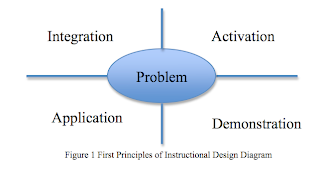
Lesson Structure
1. Students will be given the objectives of the lesson.
2. The reason why this is important will be explained to the students for them to develop reasoning and motivation for the project.
3. An overview of the project will be presented with a mind map.
4. Prerequisite knowledge will be introduced to the students. These are the new things they will need to do in order to be able to meet the objectives.
5. A demonstration of the procedure will be given to the students. This is done to model to students how to complete the project.
6. Practice will be given to the students. First in parts and then the whole project. Feedback will be given and so that adjustments can be made.
7. The final step will be an assessment of the students learning based on the revised version of their final product.
The order of this structure is based on David Merrill’s Guided Instruction. It is designed with the learning outcome in mind in order to provide the best instruction possible. The learning won’t be subject to the technology employed by the lesson. Rather the technology is secondary to the instructional design. It is a tool within the design that will be used to assist in reaching individual learner needs and increase motivation. “Effective uses of technology in education require a blend of product and idea technologies. Together, they form environments that unite technological capability with pedagogical necessity -- combining what can be done with what should be done” (Hooper, S., & Rieber, L. P., 1995, pg. 164). The goal will be for the technology to be transparent and to support the curricular goals.
V. Evaluation
The evaluations for this project will be both formative and summative. Students will need to demonstrate understanding of certain skills in order to be able to complete the project. This learning will be checked with formative assessment. There will be a short Udutu lesson embedded in the website that will check the students understanding. Once students have passed the Udutu lesson with 80% proficiency they will be allowed to continue with the project. Before turning in their final project, students will submit a draft in order for the instructor to provide feedback. The final project for the students will be assessed using a rubric that will be given to the students at the beginning of the project so they understand what is expected of them.
A final reflection from the students will be done as a video journal to help them think about their learning and to share evaluation information to the instructor about the lesson. This information along with the summative assessment will be used to identify if the students attained deeper learning from the project. It will also be used as an evaluation tool in course development for future students.
VI. References
Edutopia Staff. (2008, March 16). Why integrate technology into the classroom? : The reasons are many. Edutopia. Retrieved July 22, 2009, from http://www.edutopia.org/technology-inetgration-introduction
Eisenach, D.D. (2007). The Effectiveness of Technology in Education. Retrieved January 3, 2010 from http://www.eisenachfamily.com/pdfs/debbieeisenachsythesis.pdf
Felder, R. (2007). An introduction to learning styles: How students learn, how teachers teach and what usually goes wrong with the process [Audio Recording]. North Carolina State University. Retrieved June 5, 2009 from http://ctl.csudh.edu/SpeakerSeries/Felder.htm
Fouts, J. T. (2000). Research on computers and education: Past, present and future. Bill and Melinda Gages Foundation. Available Online at http://www.portical.org/founts.pdf
Hooper, S., & Rieber, L.P. (1995). Teaching with technology. In A. C. Ornstein (Ed.), Teaching: Theory into Practice. Retrieved from http://www.nowhereroad.com/twt
The Iowa Journal. (2008). Technology’s effect on education. Retrieved on February, 10 2010 from http://www.iptv.org/iowajournal/story.cfm/170
Mergel, B. (1998). Instructional design and learning theory. University of Saskatchewan. Retrieved March 8, 2010 from http://www.usask.ca/education/coursework/802papers/mergel/brenda.htm#Is%20There%20One%20Best%20Learning%20Theo
Merrill, D. (2001) First principles of instruction. Utah State University. Retrieved on March 5, 2101 from http://id2.usu.edu/Papers/5FirstPrinciples.PDF
Pitler, H., Hubble, E.R., Huhn, M., & Melenoski K. (2007). Using technology with classroom instruction that works. Alexandria, VA: Mid-continent Research for Education and Learning.
Solmon, G., & Schrum L. (2007). Web 2.0: New tools, new schools. Eugene, OR: International Society for Technology in Education.
As standards and pressure to succeed increases for students their own intrinsic motivation to learn has begun to decrease. New pedagogies must be utilized in order to stimulate their internal desires to learn. Many have named this generation “digital natives” because they are growing up in an age that is immersed in an ever present and evolving technology that plays a significant role in their lives. Educators must learn how to take advantage of this technology in order to make school more relevant to these learners. The technology gives educators a tool to bring the necessary learning requirements to today’s students in a way that is relevant and meaningful. This puts students back into the center of the learning environment. When it is the students who are the center of learning, the classroom becomes a place where students feel more responsible for their own learning and that natural intrinsic desire can redevelop.
II. Introduction
Problem Addressed
Students of today have been labeled as digital natives. The world in which they have grown up is a digital one. They haven’t seen a progression from things like compact disks to mp3’s. The mp3 is what they have known from the beginning. Because of their familiarity with all things digital, traditional projects such as making posters on paper or dioramas are no longer exciting to them. James Pence, Marketing Director, Teacher's Domain, WGBH:
“I think that many times kids come to school and they have to power down. At home they’re online, they’re IM’ing, they’re doing their work, they’re checking the Web, they’re going to Wikipedia, they are downloading music, they’re playing music and they’re watching television all at the same time. The classroom is not like that” (Technology’s Effect on Education, 2008).
Teachers need to learn to harness 21st century technology in order to reach the digital native and motivate them in the classroom.
The key to making this happen is to use technology as a tool to teach what is already being taught in class. The trend in education today is to teach to different styles of learning and to provide classrooms where students are actively participating in the learning. Technology fits well with this new style of teaching as it can be utilized as an instructional tool (Eisenach, 2007). The use of Web 2.0 allows teachers to move beyond the regular paper and pencil assignments and let students delve into infinite possibilities of creating and exploration on the web. The tools of Web 2.0 allow the learning that goes on in the classroom to move away from a teacher-centered approach to one where learning is student-centered through project-based learning. “Project-based learning is a constructivist approach that encourages learning in depth by allowing students to use inquiry-based methods to engage with issues and questions that are rich, real and relevant to their lives” (Solomon & Schrum, 2007, pg. 39). Technology doesn’t make learning happen. It needs to be used with good pedagogy and with the understanding that it can increase student motivation in their progress to meeting standards.
Target Audience
Various Web 2.0 tools along with other form of technology will be used to help motivate students in the middle school setting. The project will be particularly geared to 6th grade students at Grand Coulee Dam Middle School in Grand Coulee, WA. They will be using this technology to demonstrate their understanding of state standards that are being taught in the classroom.
Sharing the project
The media project will be shared with the students of Grand Coulee Dam Middle School, along with staff and administrators. The project will be created with iWeb and it will be placed on the schools website to share with everyone what the students have been doing and their reflections on the activities they have been doing throughout the year. Video will also be used to capture student reflections to determine their own feeling about the technology that was used and its affect on their motivation to complete the assignment.
III. Goals and Objectives
Instructional Goal
The subject of the media project is reading comprehension. The students who will be participating in the media project are in the 6th grade and will be working towards standards as defined by the Washington State Grade Level Expectations (GLEs). The students will learn different ways to think about their reading and demonstrate their understanding of what they have read in order to improve reading comprehension. This will improve students reading levels and give them the ability to read and remember the information. The ability to remember what you have read, after you read it, goes far beyond the reading classroom. It applies to all subject areas, as reading plays a significant role in learning. Students with better reading comprehension have a higher chance of success in school and will provide greater opportunities for them out of school.
Learning Domain
The learning domain that the media project fits into is cognitive as well as affective. Students will be learning how to improve reading comprehension. Another objective of the media project is to increase student motivation through the use of technology. This will apply to the affective learning domain, as it will be working on improving student attitudes.
Learning Objectives
1. The students will summarize the plot/message in a culturally relevant literary/narrative text.
2. The students will state the theme/message and supporting details in a culturally relevant literary/narrative text.
3. The students will identify the characters traits and provide supporting details in a culturally relevant literary/narrative text.
4. Students will demonstrate through video their understanding of how a characters traits influence their decisions.
IV. Presentation
Instructional Approach
The learning theory applied to the project will consist of multiple theories: constructivist, inquiry, and direct instruction. This is based on the fact that there is no one, ideal theory; all of them bring something valuable to the table. It is up to the teacher to understand each theory and in their pedagogy bring what is needed in order to optimize the instructional design (Mergel, 1998). When student are immersed in a learning environment that understands the learners needs, students will be able to find success in their own skills and abilities and take more leadership in their learning. This student-centered approach will be applied to the media project as it is designed to let each student utilize his or her own learning style.
Each student learns in a variety of ways. These are called an individuals learning style which can be shown: by seeing and hearing, working alone and in groups, reasoning logically and intuitively, memorizing and visualizing and modeling (Felder, 2007). When each student understands their own learning style they are aware of techniques the teacher is using and can learn when they are being taught in a way that is more beneficial to them and in ways they may struggle with, which can be a key that they need to something to compensate for that fact. Teachers who are aware of the learning needs of their students can present the information in a variety of ways in order to meet the needs of students. They can also provide opportunities for students to demonstrate their understanding by giving them a choice of methods that would better suit their learning style.
Technology plays a significant role in a teacher being able to design instruction that is student-centered and presents the information in ways that meet the different learning needs of students. “Technology has the power to reach and motivate various learners” (Pitler, Hubblell, Kuhm, & Malenoski, 2007, p. 32). Using technology is an effective way for the teacher to differentiate the instruction for their students. Students get what they need, how they need it, and they enjoy the process more, which will ultimately contribute to deeper learning for the student.
Working with the Internet and technology to create things excites students. Being able to create a video, use a blog, build a cartoon and so on motivates students to get to work. What teachers need to be aware of is that that excitement and motivation don’t always lead to the results they are looking for. Using technology is fun, but learning itself isn’t always exciting, regardless of the topics, because it requires work. It is important for instructors use sound pedagogies and not just rely on technology to do all of the teaching.
When technology is used well, it can be a positive influence on student learning when applied with clear learning goals. Technology itself isn’t the answer. It is a tool that, when used in addition to sound teaching practices, can increase student learning and achievement and it stimulates motivation to learn. (Pitler, Hubble, Kuhm, & Malenoski, 2007). Teachers need to plan lessons with the learning outcome in mind not the technology. If the technology becomes the focus, the learning that is trying to be taught becomes secondary. This will have dire effects on a lesson regardless of how exciting the technology being used is. Students will spend more time playing with the technology and focusing their energy into that end, resulting in little interaction with information they are required to learn.
Learning is most effective when the student is involved in four distinct phases of learning: activation of prior experience, demonstration of skill, application of skills, and integration of these skills into real world experiences. These phases of learning should also be apart of a problem-based type of instruction where the learning is centered around a problem introduced by the teacher (Merrill, 2001). Figure 1 illustrates this.

Lesson Structure
1. Students will be given the objectives of the lesson.
2. The reason why this is important will be explained to the students for them to develop reasoning and motivation for the project.
3. An overview of the project will be presented with a mind map.
4. Prerequisite knowledge will be introduced to the students. These are the new things they will need to do in order to be able to meet the objectives.
5. A demonstration of the procedure will be given to the students. This is done to model to students how to complete the project.
6. Practice will be given to the students. First in parts and then the whole project. Feedback will be given and so that adjustments can be made.
7. The final step will be an assessment of the students learning based on the revised version of their final product.
The order of this structure is based on David Merrill’s Guided Instruction. It is designed with the learning outcome in mind in order to provide the best instruction possible. The learning won’t be subject to the technology employed by the lesson. Rather the technology is secondary to the instructional design. It is a tool within the design that will be used to assist in reaching individual learner needs and increase motivation. “Effective uses of technology in education require a blend of product and idea technologies. Together, they form environments that unite technological capability with pedagogical necessity -- combining what can be done with what should be done” (Hooper, S., & Rieber, L. P., 1995, pg. 164). The goal will be for the technology to be transparent and to support the curricular goals.
V. Evaluation
The evaluations for this project will be both formative and summative. Students will need to demonstrate understanding of certain skills in order to be able to complete the project. This learning will be checked with formative assessment. There will be a short Udutu lesson embedded in the website that will check the students understanding. Once students have passed the Udutu lesson with 80% proficiency they will be allowed to continue with the project. Before turning in their final project, students will submit a draft in order for the instructor to provide feedback. The final project for the students will be assessed using a rubric that will be given to the students at the beginning of the project so they understand what is expected of them.
A final reflection from the students will be done as a video journal to help them think about their learning and to share evaluation information to the instructor about the lesson. This information along with the summative assessment will be used to identify if the students attained deeper learning from the project. It will also be used as an evaluation tool in course development for future students.
VI. References
Edutopia Staff. (2008, March 16). Why integrate technology into the classroom? : The reasons are many. Edutopia. Retrieved July 22, 2009, from http://www.edutopia.org/technology-inetgration-introduction
Eisenach, D.D. (2007). The Effectiveness of Technology in Education. Retrieved January 3, 2010 from http://www.eisenachfamily.com/pdfs/debbieeisenachsythesis.pdf
Felder, R. (2007). An introduction to learning styles: How students learn, how teachers teach and what usually goes wrong with the process [Audio Recording]. North Carolina State University. Retrieved June 5, 2009 from http://ctl.csudh.edu/SpeakerSeries/Felder.htm
Fouts, J. T. (2000). Research on computers and education: Past, present and future. Bill and Melinda Gages Foundation. Available Online at http://www.portical.org/founts.pdf
Hooper, S., & Rieber, L.P. (1995). Teaching with technology. In A. C. Ornstein (Ed.), Teaching: Theory into Practice. Retrieved from http://www.nowhereroad.com/twt
The Iowa Journal. (2008). Technology’s effect on education. Retrieved on February, 10 2010 from http://www.iptv.org/iowajournal/story.cfm/170
Mergel, B. (1998). Instructional design and learning theory. University of Saskatchewan. Retrieved March 8, 2010 from http://www.usask.ca/education/coursework/802papers/mergel/brenda.htm#Is%20There%20One%20Best%20Learning%20Theo
Merrill, D. (2001) First principles of instruction. Utah State University. Retrieved on March 5, 2101 from http://id2.usu.edu/Papers/5FirstPrinciples.PDF
Pitler, H., Hubble, E.R., Huhn, M., & Melenoski K. (2007). Using technology with classroom instruction that works. Alexandria, VA: Mid-continent Research for Education and Learning.
Solmon, G., & Schrum L. (2007). Web 2.0: New tools, new schools. Eugene, OR: International Society for Technology in Education.
Saturday, March 6, 2010
MAC WK 1 Blog 4 - Response to Elyse Audet
Wk 1 Free Choice Post - Technology in the Music Classroom
The following video is the basis for my discussion on technology in the music classroom. The video may be considered a bit "cheesy," but is a good starting point for critical though among peers.
Technology is something that is talked about in many circles. Yes, we do need technology in the classrooms. But so often music teachers think of this as something the other teachers must do. There is so much the music teacher can do!! Podcasts, recording music, social networks, etc. are all wonderful for the music classroom. Technology is something that is overtaking the music world, and it is important that the music teacher also keep up with that.
Music teachers so often concentrate on the performance aspect of music. We come together, tune up the instruments, rehearse, and then perform the music at a concert. There is so many other things that can be incorporated. Programs such as Finale, Smart Music, music games, videos, etc. can be used in the music classroom. These would help in engaging the students, as well as educating the students about how music is created and recorded. Programs such as Smart Music could help motivate the students to practice more, which would help the performance side of the program. MENC (Music Educators Association) has many wonderful tips on incorporating technology into the classroom. The video shows what the classroom could like like now as opposed to many years ago, and the same is true for the music classroom. We could incorporate our rehearsal area with keyboards and computers and recording areas. As music teachers we need to dream big, and find ways to better educate out students about music.
posted by elyse at 3:46 pm
1 comments:
piturachsatit said...
Unfortunately it isn't just the music teachers who often feel like technology is something that only the computer teacher needs to do. There are some computer skills that need to be taught in a class with specific objectives and standards just like any other class. This is only that case for a certain skills. The regular classroom teachers need to be aware of the technology available to them to help them take the lessons they are teaching and bring them to a whole new level for their students. The technology of today has the ability to make the classroom more exciting for students. When students are excited about coming to class more learning happens and there are less behavior problems.
March 6, 2010 5:25 PM
The following video is the basis for my discussion on technology in the music classroom. The video may be considered a bit "cheesy," but is a good starting point for critical though among peers.
Technology is something that is talked about in many circles. Yes, we do need technology in the classrooms. But so often music teachers think of this as something the other teachers must do. There is so much the music teacher can do!! Podcasts, recording music, social networks, etc. are all wonderful for the music classroom. Technology is something that is overtaking the music world, and it is important that the music teacher also keep up with that.
Music teachers so often concentrate on the performance aspect of music. We come together, tune up the instruments, rehearse, and then perform the music at a concert. There is so many other things that can be incorporated. Programs such as Finale, Smart Music, music games, videos, etc. can be used in the music classroom. These would help in engaging the students, as well as educating the students about how music is created and recorded. Programs such as Smart Music could help motivate the students to practice more, which would help the performance side of the program. MENC (Music Educators Association) has many wonderful tips on incorporating technology into the classroom. The video shows what the classroom could like like now as opposed to many years ago, and the same is true for the music classroom. We could incorporate our rehearsal area with keyboards and computers and recording areas. As music teachers we need to dream big, and find ways to better educate out students about music.
posted by elyse at 3:46 pm
1 comments:
piturachsatit said...
Unfortunately it isn't just the music teachers who often feel like technology is something that only the computer teacher needs to do. There are some computer skills that need to be taught in a class with specific objectives and standards just like any other class. This is only that case for a certain skills. The regular classroom teachers need to be aware of the technology available to them to help them take the lessons they are teaching and bring them to a whole new level for their students. The technology of today has the ability to make the classroom more exciting for students. When students are excited about coming to class more learning happens and there are less behavior problems.
March 6, 2010 5:25 PM
MAC WK 1 Blog 2 - Digital Toolkits
 Does your desktop look like mine?
 With classrooms going digital many teachers aren’t able to keep up with all of the digital files they are using on their computers. Just look at your colleague’s desktop and you can tell how well they are able to track and organize all of their files. As the digital age continues to develop teachers need to learn the skill of keeping their files organized. One way of doing this is by creating digital toolkits. A digital tool kit is a collection of digital materials based upon a unit of study. I’m sure everyone knows the teacher who has a crate or tub full of resources they used for teaching a particular unity. It is no different now with computers, excepted there isn’t a physical tub or crate to keep those tools in.
This is where file management skills come in handy. Learning to use file folders on your computer like crates and tubs, will help to create a more organized system and make your digital assets more usable. The first step with files is naming. Instead of creating a folder and labeling it pictures, organize your pictures into categories like reptiles, birds of prey and multiplying 2 digit numbers. Then these folders can be placed into other files that are based on units of study. If you are teaching a unit on birds then within that file all your teachers’ resources will be placed in that file. The best part of keeping your files organized in this manner is collaboration. Teachers can easily share resources and add to them with their own ideas or things they find.
Don’t let your computer files look like a child’s bedroom. Clean it up and see what you can accomplish.
Friday, March 5, 2010
MAC WK 1 Blog 2 - NCCE
I have had the greatest opportunity this week to come to the Northwest Council for Computer Education, NCCE. My first seminar was on what is next in educational technology by a Patrick Crispin. I wanted to share a few of the exciting things I learned from that seminar.
One of those is a Web 2.0 application called Prezi. This is a PowerPoint and Keynote killer. It turns your standard old slideshow and turns it into a powerful visual learning experience. Think animoto for slideshow. I could see this really improve visual presentations for the classrooms. Students would be drawn in to the information. Slideshows are no longer new and exciting for students and they no longer provide the same motivational effect on students as they one did. Prezi has the ability along with teacher creativity to change all of that.
The other thing that really caught my attention was dropbox. Once you sign up for an account a folder is created on your computer similar to idisk. If I add this application to multiple computers I could be working at home on a project and then when I am at school I could open up the folder on my work computer and the project would be right there as I last left it ready for me to continue working when I have a few extra minutes (that rarely happens). I plan on using this right away when I get home to help me finish my thesis.
One last thing is augmented reality. I’m not going to describe it detail just go check these sites out. You will need a webcam to use them.
http://ge.ecomagination.com/smartgrid/#/augmented_reality
http://www.livingsasquatch.com
One of those is a Web 2.0 application called Prezi. This is a PowerPoint and Keynote killer. It turns your standard old slideshow and turns it into a powerful visual learning experience. Think animoto for slideshow. I could see this really improve visual presentations for the classrooms. Students would be drawn in to the information. Slideshows are no longer new and exciting for students and they no longer provide the same motivational effect on students as they one did. Prezi has the ability along with teacher creativity to change all of that.
The other thing that really caught my attention was dropbox. Once you sign up for an account a folder is created on your computer similar to idisk. If I add this application to multiple computers I could be working at home on a project and then when I am at school I could open up the folder on my work computer and the project would be right there as I last left it ready for me to continue working when I have a few extra minutes (that rarely happens). I plan on using this right away when I get home to help me finish my thesis.
One last thing is augmented reality. I’m not going to describe it detail just go check these sites out. You will need a webcam to use them.
http://ge.ecomagination.com/smartgrid/#/augmented_reality
http://www.livingsasquatch.com
Tuesday, March 2, 2010
MAC Wk1 Blog1 Unlimited Potential
“If you aren’t prepared to be wrong then you will never come up with anything original.” Ken Robinson

